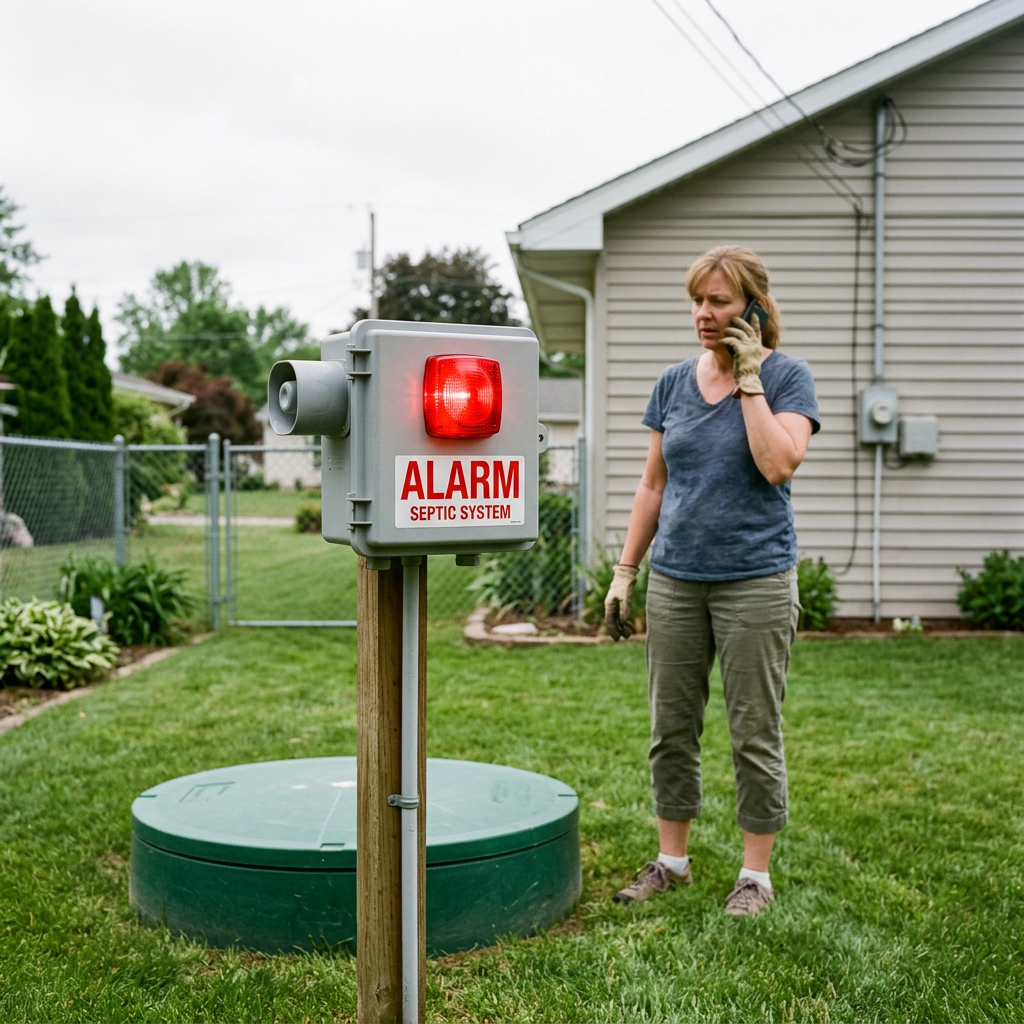
If your septic tank alarm going off it could be very frustrating. Especially since you have no idea what it is trying to tell you through either a visual (light) or audible (sound) signal. The majority of times an alarm is indicating that there is too much water in one of the pumps tanks or treatment chambers.
There could be many reasons why the alarm went on. Either your pump has failed; your breaker for the pump was tripped; or if you live where it rains a lot there could be excess rainwater running into your drain field. This is just to name a few. Also you could have used too much water; there could be something obstructing your discharge line; or there could be some type of malfunction at your control box. Depending upon how difficult this issue is to diagnose will depend upon whether or not you need a licensed septic service provider.
This guide outlines the procedures for diagnosing when a septic tank alarm goes off. Additionally, common causes, safe diagnostic techniques, warning signs, and when to cease all water usage are addressed.
Affiliate disclosure: This article contains an affiliate link. If you purchase through the link, we may earn a commission at no extra cost to you. An affiliate product cannot replace professional septic service or repair.
Key takeaways
- If an alarm sounds on your home’s septic system it typically indicates that either the water in the tank is at a higher than normal level or that one of the pumps (e.g., the effluent pump) has malfunctioned.
- Pressing a “silence” button on your control unit may be possible to stop the audible alarm however this will not correct the reason for the alarm sounding.
- Until you determine what is causing the alarm to go off, turn-off all of the water flowing through your home; do not wash clothes, take long showers/baths, run your dishwasher, etc…do not flush toilets unnecessarily.
- Turn the circuit breaker switch (if applicable) or reset the GFCI outlet only after you have determined that there is no standing water present and you can safely reach the electrical components.
- NEVER attempt to open your own septic tank(s), nor should you ever enter into any portion of a septic tank(s).
- Call a septic professional immediately if the alarm continues to sound and/or if raw sewage is backing-up into your plumbing fixtures.
What does a septic tank alarm mean?
A septic alarm usually monitors the water level in a pump tank, dosing tank, or advanced treatment unit. When the water reaches a set level, a float switch or sensor activates the alarm.
The alarm may include:
- A buzzer or horn
- A red or amber warning light
- A control panel
- A silence button
- A test button
- A pump status light
- A high-water or pump-failure indicator
Not every septic system has an alarm. Conventional gravity systems may allow wastewater to flow from the tank to the drainfield without a pump. Systems that use effluent pumps, pressure distribution, aerobic treatment units, grinder pumps, or timed dosing are more likely to include an alarm.
The U.S. Environmental Protection Agency’s septic system guidance explains that alternative septic systems may use alarms and controls to warn homeowners about operating problems.
An alarm does not always mean the septic tank is full and needs pumping. It may indicate a high water level, a pump problem, an electrical issue, or a blockage.
What to do first when the alarm goes off
Take these steps before trying to diagnose the cause.
1. Silence the alarm
If your control panel has a silence button, press it once. This stops the buzzer in many systems, but the warning light may remain on.
Silencing the alarm is only a temporary step. It does not lower the water level or repair a pump. If your panel does not have a silence button, do not open it or disconnect wires to stop the sound.
2. Reduce water use immediately
Stop using as much water as possible. Avoid:
- Washing clothes
- Running the dishwasher
- Taking long showers
- Filling a bathtub
- Flushing toilets unnecessarily
- Running faucets for long periods
- Using large amounts of water for cleaning
Some systems have limited reserve storage. Continuing normal water use can fill the tank further and increase the risk of sewage backing up or surfacing in the yard.
An Environment One homeowner manual gives similar advice for grinder pump systems. It recommends limiting toilet flushing and avoiding showers, laundry, and dishwashing while an alarm is active.
3. Check for immediate warning signs
Look around the house and yard for:
- Slow drains
- Gurgling toilets
- Sewage odors
- Wet spots near the tank
- Standing water over the drainfield
- Bright green or unusually spongy grass
- Sewage backing up into a sink, tub, or toilet
If sewage is backing up inside the home, stop using all water. Keep children and pets away from contaminated water, and call a septic service provider promptly.
You can also review this guide to septic tank backups and emergency steps.
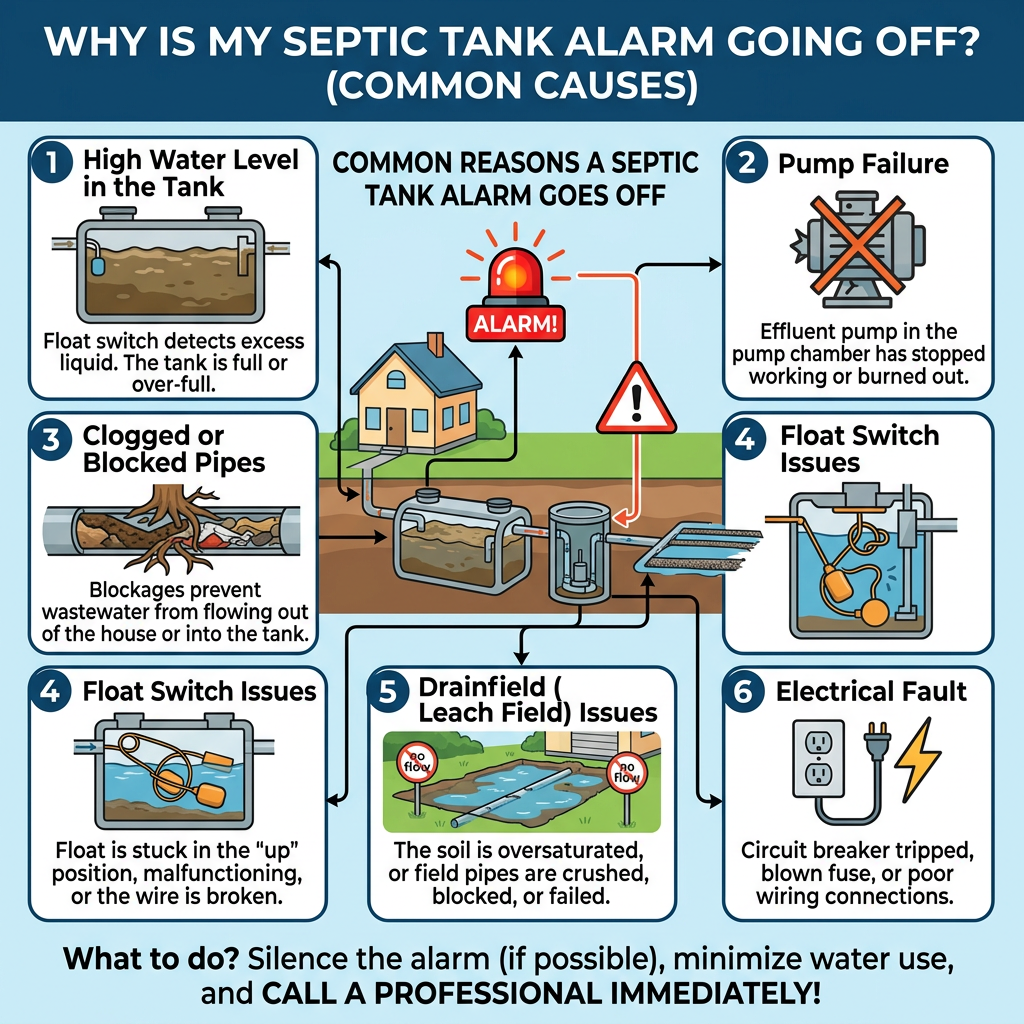
Common reasons a septic tank alarm goes off
The pump has failed
A pump may stop working because of age, mechanical failure, a damaged motor, or a blocked intake. If the pump cannot move wastewater to the drainfield or treatment area, the water level rises and activates the alarm.
A failed pump usually requires professional testing or replacement. Do not keep resetting the alarm and hoping the pump will restart.
The breaker or GFCI has tripped
A power interruption can stop the pump. Check your electrical panel from a dry, safe location. Look for a tripped breaker or GFCI outlet connected to the septic system.
Only reset the breaker if:
- The panel area is dry
- There is no burning smell
- There are no damaged wires
- Floodwater has not reached the equipment
- You can do so without opening the septic control panel
If the breaker trips again, leave it off and call an electrician or septic professional. Repeatedly resetting a breaker can create a safety hazard and may damage the equipment.
There has been a power outage
A power outage prevents an electric pump from operating. When power returns, the alarm may sound because water collected while the pump was inactive.
Reduce water use after power is restored. Some systems may need time to process the stored wastewater. The exact recovery time depends on the system design, tank size, pump capacity, and household water use.
If the alarm remains active after the system has had time to operate, contact the service provider. Follow your owner’s manual if it gives a specific time limit.
Too much water entered the system
The first few things to consider when you hear your sump pump running constantly are:
1) Do you have several loads of laundry to run today?
2) Are long showers being taken by many people in your home?
3) Have you had frequent baths?
4) Could it be due to a leaky toilet that is wasting hundreds of gallons into your septic system at once if so, please look for toilets or faucets with leaks.
5) A water softener could possibly cause this type of issue as they often produce excess water and waste, but the most likely culprit would be a guest who has used some additional water.
A leaking toilet can send hundreds of gallons into a septic system over a short period. If the alarm occurs after heavy household use, check toilets and faucets for leaks.
Heavy rain has saturated the soil
Heavy rain can reduce the drainfield’s ability to accept wastewater. Surface water may also enter through damaged tank lids, loose risers, cracked pipes, or poor grading.
When the soil around the drainfield is saturated, wastewater may move more slowly. The pump can continue operating while the alarm remains active.
Do not drive over a wet drainfield. Avoid using the area for parking, storage, or outdoor events. The EPA’s flood guidance for septic systems warns that pumping a tank while the drainfield is flooded or saturated may create additional problems, including the risk of tank flotation.
A float switch is stuck
Many systems use floats to measure water level and control the pump. A float can become stuck because of debris, grease, buildup, a damaged cord, or contact with the side of the tank.
You may be able to observe the alarm panel from outside, but do not open the tank or reach inside to move a float. Septic tanks contain toxic gases and unsafe conditions. A technician can inspect the float safely.
The discharge line is blocked
A blockage in the discharge line can prevent wastewater from leaving the pump tank. The pump may run, but the water level will not fall.
Possible causes include:
- Solids entering the pump chamber
- Grease buildup
- Roots
- A crushed pipe
- Ice in cold climates
- A closed or damaged valve
- A clogged filter
- A problem at the drainfield
This issue requires a professional diagnosis. Do not disconnect the pump or attempt to force the line clear without the correct equipment.
The control panel has a fault
A failed relay, sensor, timer, fuse, or wiring connection can activate the alarm. It can also prevent the pump from starting or stopping correctly.
Control panels vary between manufacturers. Do not assume that a red light always means the same thing. Use the manual for your specific model, or contact the installer or service company.
How to troubleshoot a septic tank alarm safely
You can perform a few basic checks without opening the tank or control panel.
Check the owner’s manual
Look for the model number on the alarm box. The manual may explain what each light and sound means.
It may also show:
- The location of the silence button
- The location of the test button
- The correct breaker
- Normal pump cycle times
- Emergency contact information
- Reset instructions
If you do not have the manual, contact the system installer, manufacturer, county health department, or a local septic professional.
Check power from a safe location
Look at the electrical panel and any exterior GFCI outlet connected to the pump. Do not touch wet electrical equipment.
If the system has no power, restoring power may allow the pump to run. Watch the alarm light from a safe distance. If the pump does not start or the breaker trips again, stop using water and call for service.
Look for surface water
Inspect the area around the tank and drainfield without walking through sewage or standing water. Surface water, flooding, or a saturated drainfield may explain why the alarm is active.
Keep stormwater away from the septic system. Gutters, sump pumps, and downspouts should not discharge into the tank or drainfield.
Listen for the pump
Some systems make a noticeable sound when the pump operates. A pump that runs continuously may indicate a blocked line, saturated drainfield, or high water flow. A pump that never starts may have a power, motor, float, or control problem.
Do not assume that a quiet pump is a failed pump. Some systems operate on timers and may not run immediately.
Should you keep using water?
Use as little water as possible until the alarm is resolved.
A small amount of necessary use may be acceptable on some systems, but the correct advice depends on the design and the available reserve capacity. If the alarm is accompanied by slow drains, sewage odors, or a backup, stop using all water.
Avoid these activities:
- Laundry
- Dishwashing
- Baths
- Long showers
- Water-hungry appliances
- Unnecessary flushing
- Running multiple plumbing fixtures at once
If you have a house full of guests, ask everyone to limit water use. A short period of conservation may prevent an indoor backup while you wait for service.
What if the alarm goes off after heavy rain?
An alarm after heavy rain may be temporary, but it should not be ignored.
Rain can saturate the drainfield and slow wastewater dispersal. It can also expose problems that were already present, such as:
- Poor yard drainage
- A damaged tank lid
- Cracked inlet or outlet pipes
- Roots near the piping
- A failing drainfield
- Stormwater flowing toward the septic system
Reduce water use and monitor the system. If the alarm remains active after the soil begins to dry, call a professional.
If floodwater has reached the pump, control panel, or electrical equipment, do not touch the equipment. Keep away from the area and contact a qualified professional.
The septic drainfield guide explains how drainage, soil conditions, and wastewater flow affect drainfield performance.
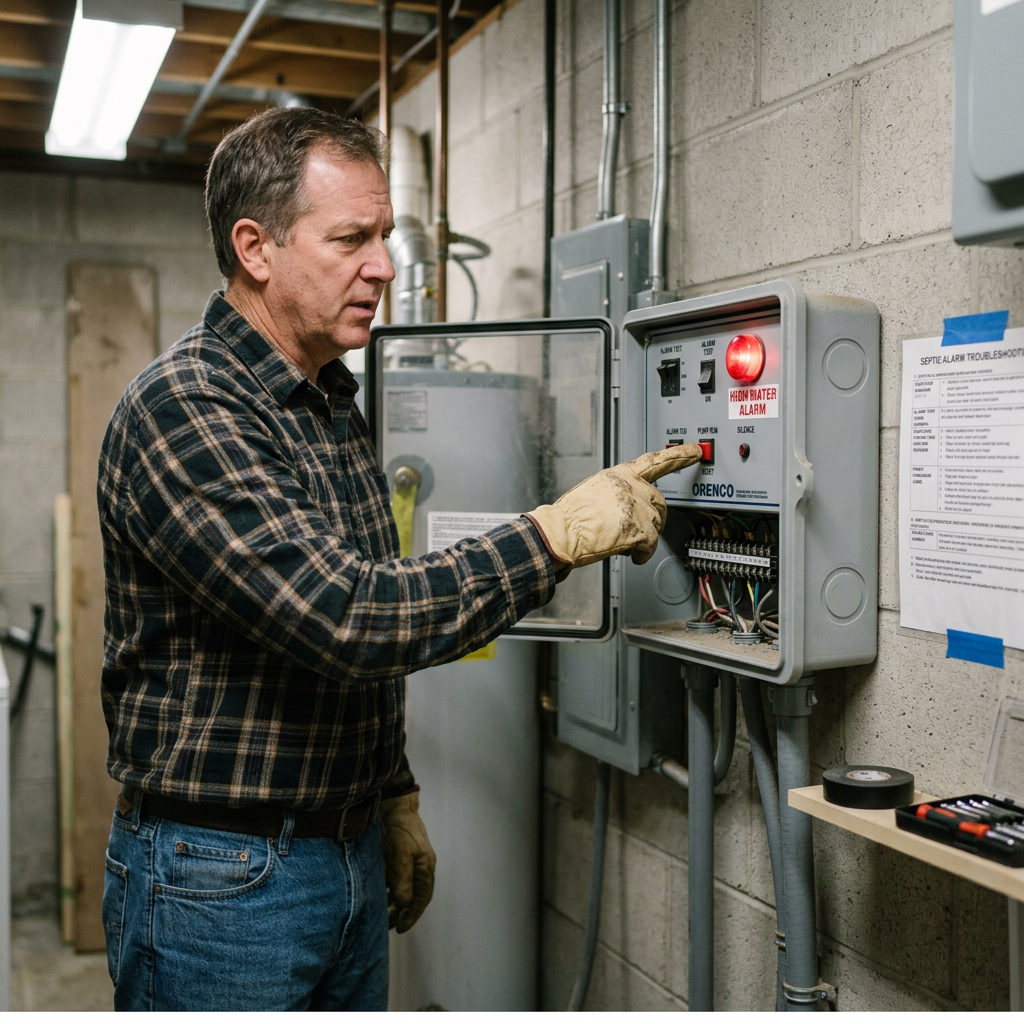
Can you reset a septic tank alarm?
You can press a reset button only when the owner’s manual recommends it. A reset may clear a temporary notification after a power interruption, but it will not repair the underlying issue.
Do not repeatedly reset the system if:
- The alarm returns quickly
- The pump does not run
- The alarm light stays on
- Water is backing up
- Sewage is surfacing
- The breaker trips
- The pump runs continuously
Repeated resets can delay repairs and increase the chance of an overflow.
Can SeptiFix fix a septic alarm?
No. A septic treatment tablet cannot repair a failed pump, tripped breaker, stuck float, damaged control panel, blocked discharge line, or saturated drainfield.
The EPA’s septic tank additives fact sheet does not recommend routine use of septic additives for domestic wastewater treatment. A properly designed septic system already contains natural microorganisms that help break down organic waste.
If you are separately researching septic treatment products, you can review SeptiFix here. Do not use any additive as a response to an active alarm, and do not delay professional service.
If you decide to use a treatment product for routine maintenance, follow the product label and your local septic regulations. Additives should never replace inspections, pumping, water conservation, or repairs.
When should you call a septic professional?
Call a qualified septic professional when:
- Alarm doesn’t reset
- Pump won’t turn on
- Pump runs continually
- Breaker trips again
- Raw sewage backflowed into the home
- Wastewater accumulating in the yard
- Drain field saturated
- Control Panel Damaged
- Flood Damage to the System
- Strong Sewage Odor
- Don’t Know Which Section Alarm Monitors
The EPA’s guidance on resolving septic malfunctions recommends contacting a local septic service provider, health department, or wastewater authority when a system shows signs of failure.
Ask the technician to identify the cause, not just silence the alarm. A proper service visit may include testing the pump, floats, electrical supply, control panel, filters, discharge line, and tank levels.
How to prevent future septic alarm problems
You cannot prevent every pump or control failure, but regular care can reduce the risk.
- Have your tank inspected and pumped as needed for your system.
- Fix leaks in the toilet or faucet(s).
- Don’t wash all your clothes at once during the week; spread them out.
- Prevent grease, wipes, chemicals, and anything else that is not intended to be flushed from entering into the sewer lines through the drains.
- Do not park cars on top of the tank or over the drain field.
- Ensure that no roof or surface water will enter into your septic system.
- Provide some protection to the control panel so it won’t get damaged by excessive moisture, etc.
- Before you have an emergency, learn how to shut down the alarm.
- Leave the phone number of the service provider next to the alarm panel.
- Maintain records of the pumpings, inspections, repairs, and alarms.
You can learn more about maintenance in the article on how often to pump a septic tank.
Final thoughts
A septic tank alarm alert should be answered immediately. The warning could indicate only a temporary power problem but more likely indicates one of many different problems including; a failed pump, clogged drain line, stuck float, high water level in the tank, or an overloaded drain field.
If your panel allows it to be done silently the alarm. Reduce the amount of water used. Check the electrical supply when it is safe. Never open the tank. Never enter the tank. Never repeatedly reset the system.
If the alarm continues, sewage backs up into your home, wastewater begins draining onto your yard, contact a licensed professional who specializes in septic systems as soon as possible.
Frequently asked questions
Is a septic alarm an emergency?
It can be. An alarm means the system needs attention, but the urgency depends on the cause. It becomes an emergency if sewage is backing up, wastewater is surfacing, the pump is not working, or the alarm continues while the water level rises.
Can heavy rain cause a septic alarm?
Yes. Saturated soil can prevent the drainfield from accepting wastewater normally. Heavy rain can also allow water to enter through damaged tank covers or pipes.
How long can I ignore a septic alarm?
Do not ignore it. Silence the buzzer if needed, reduce water use, and contact a service provider if the alarm does not clear after a safe power check or normal operating period.
Should I turn off the septic pump?
Do not turn off the pump unless your owner’s manual, electrician, septic professional, or local authority tells you to do so. During flooding, stay away from electrical equipment and follow local emergency guidance.
Can I shower when the septic alarm is on?
It is best to avoid showering until you know the cause. If you must use water, keep it brief and use as little water as possible. Do not shower if drains are slow or sewage is backing up.
Why does the alarm keep coming back?
A recurring alarm may be caused by a weak pump, stuck float, clogged filter, damaged discharge line, excessive water use, a failing drainfield, or an electrical problem. Recurring alarms require professional diagnosis.
Does a septic alarm mean I need to pump the tank?
Not always. The alarm may monitor a pump chamber rather than the main septic tank. A professional can check the tank level, sludge level, pump, floats, and filters before recommending pumping.
Can septic additives stop an alarm?
No. Additives cannot repair electrical problems, pumps, floats, alarms, blocked lines, or saturated drainfields. They should never be used instead of professional service.
Should i check my pump on my own?
You can look at the alarm panel to see if it is tripped; you can also check an exposed, accessible (not locked) breaker or GFCI. Never pull the electrical cover off of the tank; do not touch wiring; never put hands in the pump chamber.
Who should i call for a septic alarm?
The company that either installed or is responsible for maintaining your system, a licensed septic service provider, or your local health department. If there is some kind of hazard associated with unsafe electrical equipment you will probably have to hire a certified electrician.
Give your septic system extra support with SeptiFix, an easy-to-use monthly tablet designed to help maintain a cleaner, healthier tank between professional inspections.

USA-Based Septic System Resources
These U.S. government and public health resources provide additional information about septic alarms, maintenance, flooding, and system problems:
- EPA Septic Systems
General information about septic systems, maintenance, treatment options, and homeowner responsibilities. - EPA Septic System Care and Maintenance
Guidance on water use, pumping, maintenance, inspections, and preventing septic system problems. - EPA Resolving Septic System Malfunctions
Explains what homeowners should do when a septic system stops working correctly. - EPA Septic Systems and Drinking Water
Explains how a failing septic system can affect groundwater and nearby drinking water sources. - CDC Guidelines for Septic and Onsite Wastewater Systems
Provides safety advice for septic systems affected by flooding, including electrical equipment precautions. - CDC Wastewater Resources
Covers public health risks connected to malfunctioning septic systems and wastewater contamination. - North Carolina Department of Health and Human Services, Septic Systems After Excessive Rain
Explains why a high-water alarm may sound after flooding or heavy rain and when to contact a septic professional. - Massachusetts Department of Environmental Protection, Caring for Your Septic System
Provides state-level guidance on pumping, maintenance, warning signs, and septic system care. - Alaska Department of Environmental Conservation, Maintaining Your Septic System
Offers practical maintenance advice, including pumping, protecting the drainfield, and managing rainwater.
Related Posts